Bingo is the ultimate game for any occasion. Whether you're organizing a classroom activity, hosting a family game night, or spicing up a virtual gathering, bingo cards are a go-to. The best part? You don’t need to spend hours designing them yourself. With bingo cards.io, you can whip up free bingo cards in no time—and a batch of up to 10 unique cards is completely free. Let’s dive into how you can use our tool to create custom bingo cards, print them, and even unlock more options when needed.
What are free bingo cards?
Free bingo cards are often created using a bingo card generator, which allows you to print the cards or download a free PDF for printing. Many of these generators (like us!) also offer ready-to-use game templates for a variety of fun occasions. Instead of purchasing pre-made cards or spending time crafting them manually, tools like bingo cards.io empower you to design cards that suit your specific needs—whether it’s for a school lesson, a baby shower, or a Zoom party. Curious about what you can create for free? Check out some of our examples below!
Popular bingo templates
See allThe best part? Whether you start from a blank card or choose from hundreds of ready-made templates you can create and print batches of up to 10 unique bingo cards for free. If you need more than that, we’ve got you covered with upgrade options.
How to create free bingo cards with bingo cards.io
Step 1: Sign up for free
Getting started with bingo cards.io is as simple as clicking a button. Create a free account in seconds, and you'll have access to all the tools you need to make your bingo cards. You don’t need to download any software—everything is online. Once you’re in, you’re ready to make your first set of bingo cards.
Step 2: Customize your bingo cards
Here’s where the magic happens! bingo cards.io offers a huge range of customization options, more than any other card generator out there, so you’re not stuck with boring, one-size-fits-all templates. Let’s break down what you can do:
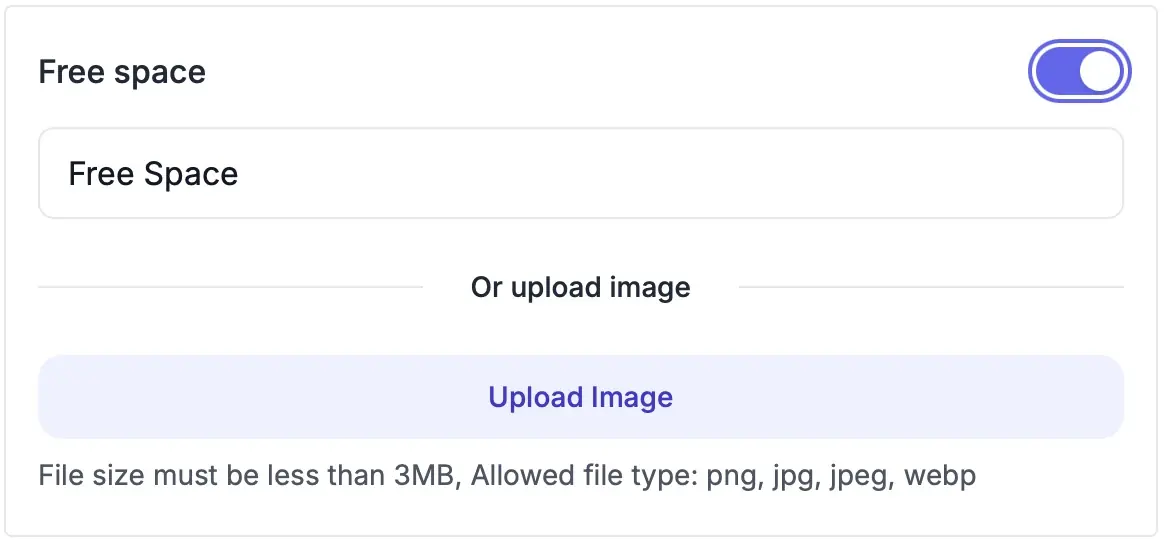
- Change the Free Space: Customize the center “free space” to say anything you want—or remove it entirely.
- Column Headers: Tired of the traditional B-I-N-G-O header? You can replace those column titles with your own custom headers, perfect for themed games or educational purposes.
- Logos Instead of Titles: Want to make your game even more unique? Replace the traditional card title with a custom logo or image. Perfect for adding a brand logo, school mascot, or party theme.
- Background Colors: Choose from a range of background colors and images for your bingo cards to match the vibe of your event—whether it’s a bright and fun color for kids or a more sophisticated tone for corporate events.
- Fonts & Text Size: Choose from different font styles and sizes to personalize your cards. Whether you want sleek, elegant fonts or bold, playful ones, there are plenty of options.
- Grid Colors & Shapes: Customize the grid itself by changing the color of the lines or even adjusting the shape of the squares. You can go for simple black and white or mix it up with colorful grids that stand out.
- Multi-colored Grid: For an extra touch of flair, you can make each square in the grid a different color. Perfect for party-themed cards or visually engaging educational materials.
- Custom Layouts: Need something a little different? Adjust the layout of your bingo cards. You can choose from different grid sizes (3x3, 5x5, etc.), making it easier to fit your game type.
- Add Custom Images or Icons: Instead of sticking to words, why not upload custom images or icons for your cards? Great for younger audiences or themed parties. You can even add captions that show on the card!
The possibilities are almost endless, giving you full control over how your bingo cards look. The best part? Most of these editing features are free. Uploading your own images and removing our branding come with the Plus or Pro plan.
Step 3: Print or download your free bingo cards
Once your masterpiece is ready, it’s time to print! With bingo cards.io, you can either print your cards directly or download them as a PDF file, making it super easy to share or print later.
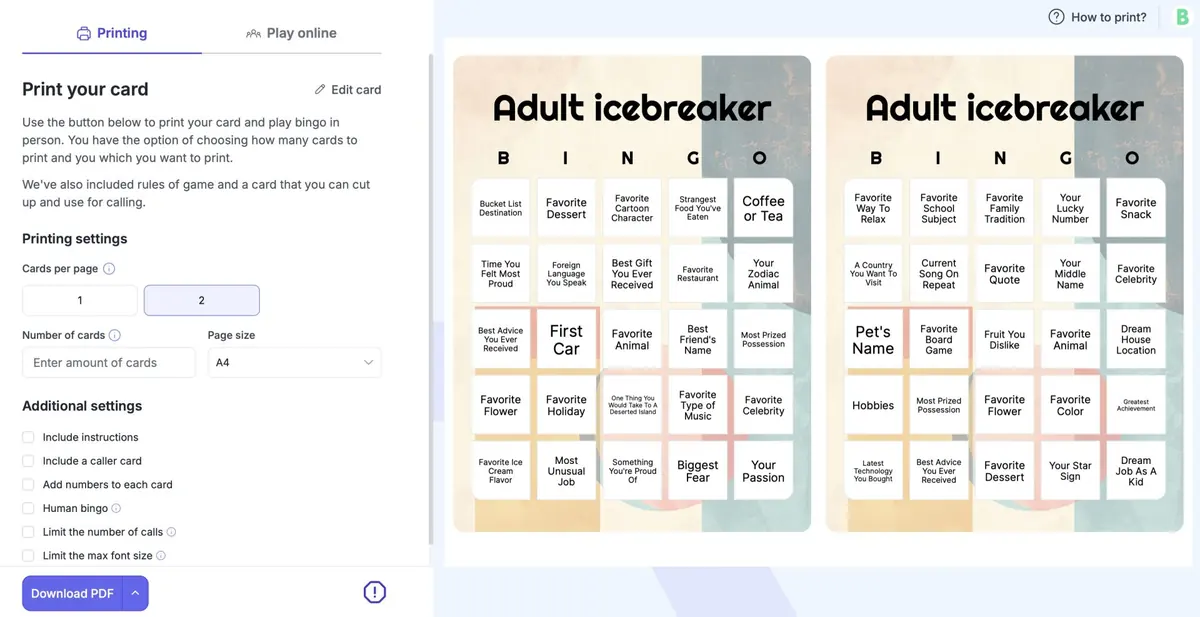
Even when you get to the printing stage, you have a huge range of options, such as adding caller cards, numbering each card, enabling human bingo by adding some space to the grid for writing, and even tweaking the font size to your liking.
After printing, you have the option to use our virtual bingo caller, which dynamically announces items from your card grid on your screen.
But what if you need more than 10 cards at a time? Here’s how to unlock bigger print batches.
Unlock bigger print batches
Ten free cards per batch are great, but bigger gatherings need more. Plus ($8.99 a month) prints batches of up to 500 unique cards, hosts live games for up to 50 players, and lets you upload your own images and remove our branding. Pro ($19.99 a month) raises that to 2,000-card batches and 200 live players, and opens the full template library. See plans and pricing for the details.
You can cancel a paid plan anytime, and the Free plan stays free for as long as you like. There’s no pressure—just flexibility.
Top features of bingo cards.io
While the focus here is on creating free bingo cards, bingo cards.io offers a lot more under the hood:
- Endless customization options: Create truly unique cards with full control over grids, fonts, colors, and content.
- Flexible printing: Print directly from your browser or download your bingo cards as PDFs for easy sharing.
- Online game hosting: Perfect for virtual events, you can host games for up to 200 players.
- User-friendly interface: No complicated software or design skills needed. If you can click, you can create bingo cards.
Frequently asked questions
Can I use bingo cards.io on any device?
Yes! bingo cards.io is web-based, so you can use it on any device with an internet connection—whether it’s a laptop, tablet, or smartphone.
How often can I use the free option?
Whenever you need to. The Free plan prints batches of up to 10 unique cards; bigger batches, image uploads and unbranded cards come with Plus or Pro.
What do the paid plans cost?
Plus is $8.99 a month (or $71.99 a year) and Pro is $19.99 a month (or $159.99 a year). You can cancel anytime from your account.
Conclusion
With bingo cards.io, making free bingo cards has never been easier—or more fun. Whether you need a quick set of 10 free cards or a 500-card batch on Plus, you’ll have everything you need to create, customize, and print your own bingo cards in minutes. Why not get started today?